Most monitoring stacks are not stacks — they are collections. A team installs Zabbix because someone knew it, adds Grafana because a tutorial looked good, bolts on Graylog when log search becomes painful, and ends up with three tools that share a screen but not a purpose. The alerts fire independently, the dashboards duplicate each other, and the on-call engineer toggles between tabs trying to reconstruct what happened from three different views of the same incident. This post is the other approach: three tools chosen deliberately, integrated at the data layer, and tuned until the alerts mean something. The stack that took a defense-sector enterprise from alert fatigue to quiet nights — 142 hosts monitored end-to-end, 87% alert noise reduction, $6,200 saved per month versus the proprietary equivalent.
Why three tools, not one
No single tool does metrics, logs, and visualization well. The all-in-one platforms try, and they compromise on at least one. The three-tool stack is a division of labor along the lines each tool was built for:
- Zabbix collects metrics and triggers alerts. Its native agent covers host telemetry — CPU, memory, disk, network, process state — without a separate metrics pipeline. SNMP handles network devices. The alerting engine is mature enough for real escalation logic, not just threshold bumps.
- Graylog ingests, parses, and searches logs. When an alert fires, the logs that explain it are one query away, not five tools away. Structured ingestion means logs from different services are normalized into a common format before they hit the search index.
- Grafana visualizes data from both. Dashboards pull from Zabbix and Graylog data sources side by side, so an engineer investigating an incident sees metrics and logs together without switching context.
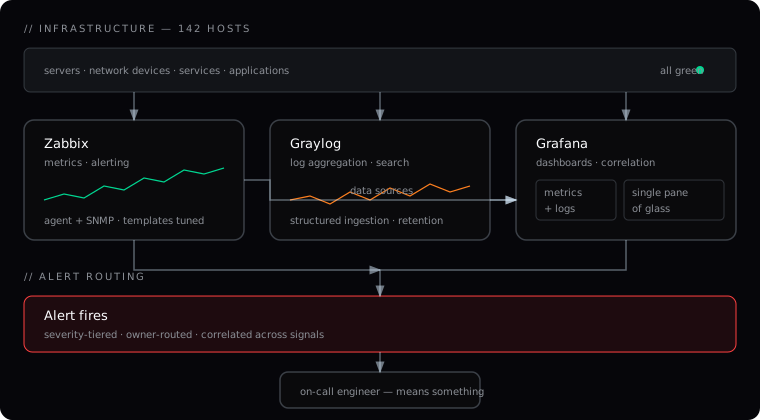
The integration point is Grafana. It is not a separate silo — it is the layer that makes the other two useful together. A dashboard that shows a CPU spike from Zabbix next to the error log burst from Graylog turns two separate signals into one story. That is what “single pane of glass” actually means: not one tool, but one view assembled from the right tools.
Where they don’t fit together
Honesty about the seams matters more than pretending they don’t exist. Three are worth naming:
Zabbix and Graylog do not share a query language. Zabbix uses its own templating and trigger syntax; Graylog uses Lucene-based search with GEL (Graylog Extended Lookup). A dashboard that correlates a Zabbix metric with a Graylog log query is two separate queries stitched together by Grafana, not a single joined query. For most incident investigations this is fine — the engineer runs them in parallel and reads them together. For automated correlation across both, you need to accept the stitching or invest in a unified log-metrics store, which is a different and more expensive architecture.
Grafana’s Zabbix data source is not as polished as its Prometheus data source. The Prometheus ecosystem gets the most Grafana attention. The Zabbix plugin works, but some advanced features — ad-hoc filters, templated dashboard variables — behave differently. If your team is used to Prometheus-backed Grafana dashboards, the Zabbix-backed ones feel slightly less fluid. The trade-off is that Zabbix gives you agent-based host monitoring with alerting built in, which Prometheus does not without adding Alertmanager and a separate agent layer.
Graylog’s resource footprint is non-trivial. Graylog runs on Elasticsearch or OpenSearch under the hood, and a log-heavy environment needs real hardware — not a shared VM. Size the Graylog cluster for your peak log ingest rate plus headroom, and tune retention policies aggressively. Keeping thirty days of structured logs is usually enough for incident investigation; keeping a year is a storage cost that rarely pays off.
The tuning that turns alerts into signal
Installing the stack is the easy part. The work that produced the 87% noise reduction was not deployment — it was alert tuning. The old stack had hundreds of rules, most firing independently with no correlation. The new ruleset was rebuilt around three principles:
Alert on conditions, not on thresholds. A CPU spike at 3 a.m. on a batch server is normal. A CPU spike that persists for five minutes on a customer-facing API server is an incident. The rule is not “CPU > 80%” — it is “CPU > 80% on hosts in the API tier for 5 consecutive checks, correlated with error rate above baseline.” The correlation is what separates signal from noise.
Every alert has an owner and an escalation path. An alert without an owner goes to a channel nobody reads. An alert with an owner goes to the person who can act on it, with a defined response time and a defined escalation if they do not respond. The escalation matrix lives in the knowledge base, not in someone’s head.
Tune against real baselines, not defaults. Default thresholds are wrong for every environment. The production baseline is measured over a week of normal operation, and the thresholds are set relative to that baseline — not to a number someone copied from a tutorial. The baseline history is documented so the team can re-tune without re-learning the environment.
What the team owns afterward
The engagement ended with the customer operations team running the dashboards, alert rules, and escalation playbooks. The knowledge base held the tuning rationale — why each threshold was set where it was, what the baseline looked like, what the escalation path was for each severity. The team could adjust thresholds without re-deriving the reasoning from scratch, and they could extend the stack to new services without waiting for outside help.
The part that stayed with us was the observability architecture and the alert governance — the decisions about what warrants an alert, what warrants a page, and what stays as a dashboard metric for trend analysis. Those are the calls that are cheap to get wrong and expensive to fix after the team stops trusting the alerts. Get them right at the start, and the stack compounds. Get them wrong, and the team learns to ignore the noise — which is the same as having no monitoring at all, only more expensive.