Proxmox VE is a capable virtualization platform with a reasonable default configuration. That default configuration is not production-ready for a regulated environment. The gap between “installed” and “hardened” is where most of the attack surface lives, and it is the gap that gets skipped when the installation guide ends at “log in to the web UI.” This post covers the hardening steps applied to Proxmox VE clusters running in production — the ones that actually reduce risk, not the checklist items that look good on a compliance form. No theory, no “consider doing X.” What is done, why, and what it costs.
Network isolation
The Proxmox web UI and API listen on port 8006 by default, on every interface. The first hardening step is to make sure they do not listen on every interface.
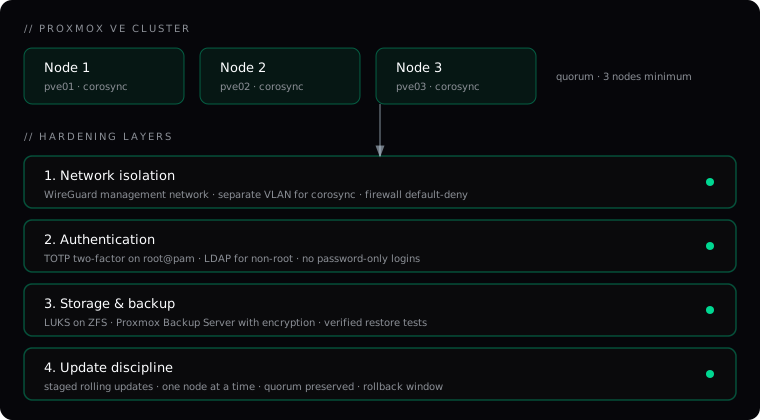
Dedicated management network. The cluster communication (corosync) and the management interface run on a separate VLAN from the VM and container traffic. The management network is reachable only through a WireGuard tunnel from the operations team — not from the general corporate network, not from the internet. A host that is not on the WireGuard network cannot reach the Proxmox web UI at all.
Separate corosync network. Corosync carries the cluster heartbeat. If it shares a network with VM traffic, a broadcast storm or a misconfigured bridge can split the cluster. The production setup is a dedicated corosync link on a separate VLAN, with redundant paths where the hardware allows it. The corosync configuration binds to the management interface explicitly, not to all interfaces.
Firewall default-deny. The Proxmox firewall is enabled at the datacenter level, with a default-deny policy on inbound traffic. Rules are added explicitly for the management network (WireGuard subnet), for the corosync peer addresses, and for the services that need to be reachable. Everything else is dropped. The firewall is configured before any VMs are migrated, not after — a cluster that runs for a week with an open firewall accumulates log noise that makes it harder to verify the rules later.
Two-factor authentication
The default Proxmox authentication is root@pam with a password. That is the account that can do anything — destroy VMs, wipe storage, reconfigure the cluster. A password-only account with that level of privilege is not acceptable in production.
TOTP two-factor on root@pam. Every member of the operations team has a TOTP secret enrolled — Google Authenticator, Authy, or any standard TOTP app. Login requires the password and the current six-digit code. The recovery codes are stored in a sealed envelope, not on a wiki page.
LDAP for non-root accounts. Day-to-day operations do not need root. The team has individual LDAP accounts with scoped permissions — a user who needs to start and stop VMs gets that permission, not full cluster admin. The root account is reserved for cluster-level changes and is used rarely enough that its logins are notable events.
No password-only SSH. SSH to the Proxmox hosts is key-based only, with password authentication disabled. The root SSH key is on a hardware token, not on a shared laptop. SSH is restricted to the WireGuard management network — port 22 does not listen on the public interface.
Encrypted storage and verified backups
Storage encryption is a trade-off. It adds a small CPU cost on every read and write, and it adds operational complexity — the key has to be available at boot, and losing the key means losing the data. For a regulated environment, the trade-off is worth it. For a development cluster, it usually is not.
LUKS on ZFS. The ZFS pool sits on LUKS-encrypted devices. The keys are loaded at boot from a key management server on the WireGuard management network — not stored on the host, not typed in manually. A host that boots without the key server available does not start its storage pool, which is the correct failure mode: a stolen host without network access to the key server is a host with encrypted paperweights for disks.
Proxmox Backup Server with encryption. Backups are encrypted at the PBS layer, with a separate key per backup namespace. The PBS instance runs on a separate host, in a separate location, with its own access controls. A compromise of the Proxmox cluster does not automatically compromise the backup server.
Verified restore tests. A backup that has not been restored is a hypothesis, not a backup. The production discipline is a monthly restore test: pick a random VM, restore it to an isolated network, verify it boots and its services start. The test is automated and the result is logged. A failed restore test is an incident, not a note in a spreadsheet.
Update discipline
Proxmox releases updates regularly — security patches, bug fixes, new features. The failure mode is not “we don’t update” — it is “we update all nodes at once and something breaks the cluster.” The production discipline is staged rolling updates:
One node at a time. Updates are applied to one node, the node is rebooted if required, and the cluster is observed for at least an hour before the next node is touched. Corosync maintains quorum throughout — three nodes is the minimum cluster size precisely so that one node can be down without losing quorum.
Test on a non-production node first. If the cluster has more than three nodes, the update is applied to the least-critical node first. If the cluster has exactly three, the update is applied to a test cluster first — a small Proxmox installation that mirrors the production configuration and exists specifically to catch update regressions before they reach production.
Rollback window. Proxmox supports rollback via ZFS snapshots on the root dataset. Before an update, a snapshot is taken. If the update breaks something — a kernel panic, a web UI failure, a corosync incompatibility — the node is rolled back to the pre-update snapshot and the update is held until the issue is understood. The rollback window is 24 hours; after that, the snapshot is cleaned up to avoid storage bloat.
What is not on this list
A few common “hardening” recommendations are deliberately absent, because they either do not reduce real risk or they add cost without benefit:
Disabling the web UI entirely. Some guides recommend SSH-only administration. The Proxmox web UI is the only way to do some operations cleanly — VM migration, storage management, cluster join. Disabling it and doing everything over the CLI is slower and more error-prone, and it does not reduce the attack surface if the UI is already restricted to the WireGuard network. The right answer is network isolation, not UI removal.
AppArmor or SELinux in enforcing mode. Proxmox does not officially support AppArmor or SELinux in enforcing mode on the host. Running them in permissive mode for audit logging is reasonable; running them in enforcing mode risks breaking cluster operations for a marginal security gain. The threat model that matters for a Proxmox host is network-based access, not local privilege escalation — and the network layer is already locked down.
The part that compounds
Each of these steps is a one-time configuration effort. What makes them valuable over time is that they are documented — in the knowledge base, with the reasoning behind each choice, so the team can maintain the posture without re-deriving it. A hardened cluster that nobody understands is a cluster that drifts back to defaults the first time someone needs to “just get it working.” A hardened cluster with documented reasoning is a cluster that stays hardened, because the team knows why each rule exists and what it costs to remove it.
That is the difference between a hardening checklist and a hardening practice. The checklist is this post. The practice is the knowledge base that explains it, the runbooks that operationalize it, and the team that owns it — the discipline we bring to security and compliance engagements.